Agent Mode
Agent Mode is Taleva's AI-powered sourcing assistant. Instead of manually searching and filtering, you simply describe the role you're hiring for in plain language, and the agent starts sourcing candidates for you. It's the fastest way to go from a hiring need to a list of relevant people to review.
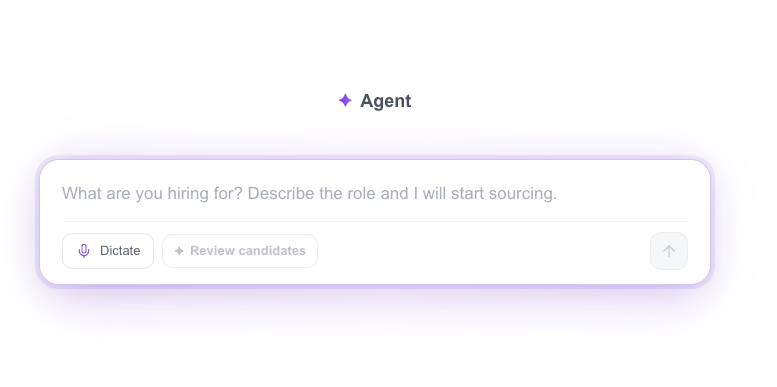
- Describe Your Role: The central prompt box is where you tell the agent what you're looking for: "What are you hiring for? Describe the role and I will start sourcing." Enter your requirements and the agent handles the search on your behalf.
- Dictate: Prefer to speak? Use the Dictate option to describe the role by voice instead of typing.
Getting the Best Results
Agent Mode works best when you give it clear, well-defined instructions. The quality of what you get back depends heavily on the quality of your prompt, so a little extra detail up front goes a long way.
Do
Input a precise and detailed prompt. The more context you provide, the better the agent can understand your intent and deliver the result you're looking for.
Don't
Input a vague, three-word instruction. Too little context leaves the agent guessing and leads to weaker results.
Best for: quickly kicking off candidate sourcing from a plain-language description of your role, without manual searching or filtering.
Reviewing Candidates (Revision Mode)
After the agent sources candidates, Revision Mode is where you review them one at a time and decide who moves forward. Each candidate is presented as a full profile next to the agent's reasoning, so you can make an informed decision quickly rather than digging through raw data.
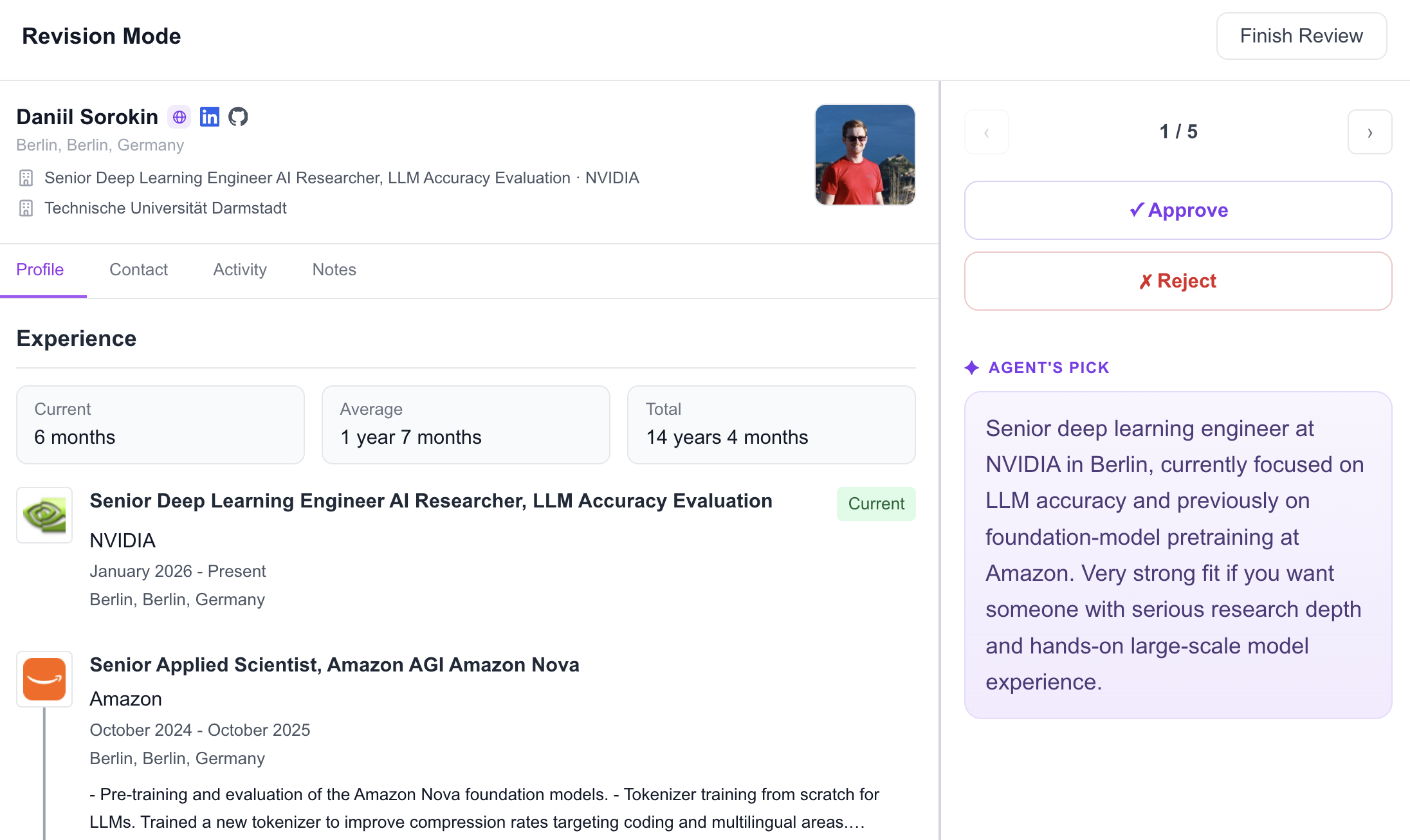
- Candidate Profile: The main panel shows the candidate's full CV: name, location, current role, education, and a detailed Experience timeline with durations (Current, Average, and Total tenure). Tabs let you switch between Profile, Contact, Activity, and Notes for a complete picture of each person.
- Agent's Pick: On the right, the Agent's Pick panel explains why the agent selected this candidate, summarizing their key strengths and fit for your role. This gives you the reasoning behind each recommendation, so you're not evaluating in a vacuum.
- Approve / Reject: Make a decision with a single click: Approve to move the candidate forward, or Reject to pass.
- Add to Shortlist: When you approve a candidate, Taleva asks "Add to shortlist?" Choose Yes to add them to your Shortlist and move them into your workflow. Choose No if they're already part of another project or someone you've previously contacted. This lets you approve the agent's pick without creating a duplicate entry.
- Navigation & Progress: A counter (e.g., 1 / 5) tracks your position in the review queue, and the arrows let you move between candidates. When you're done, click Finish Review to complete the session.
Always give feedback
Whether you approve or reject, provide feedback on your decision, especially when you reject. Explaining what wasn't a fit helps the agent understand what to change, so its future picks get progressively closer to what you're looking for. The more you tell it, the smarter your sourcing becomes.
How the Agent Iterates
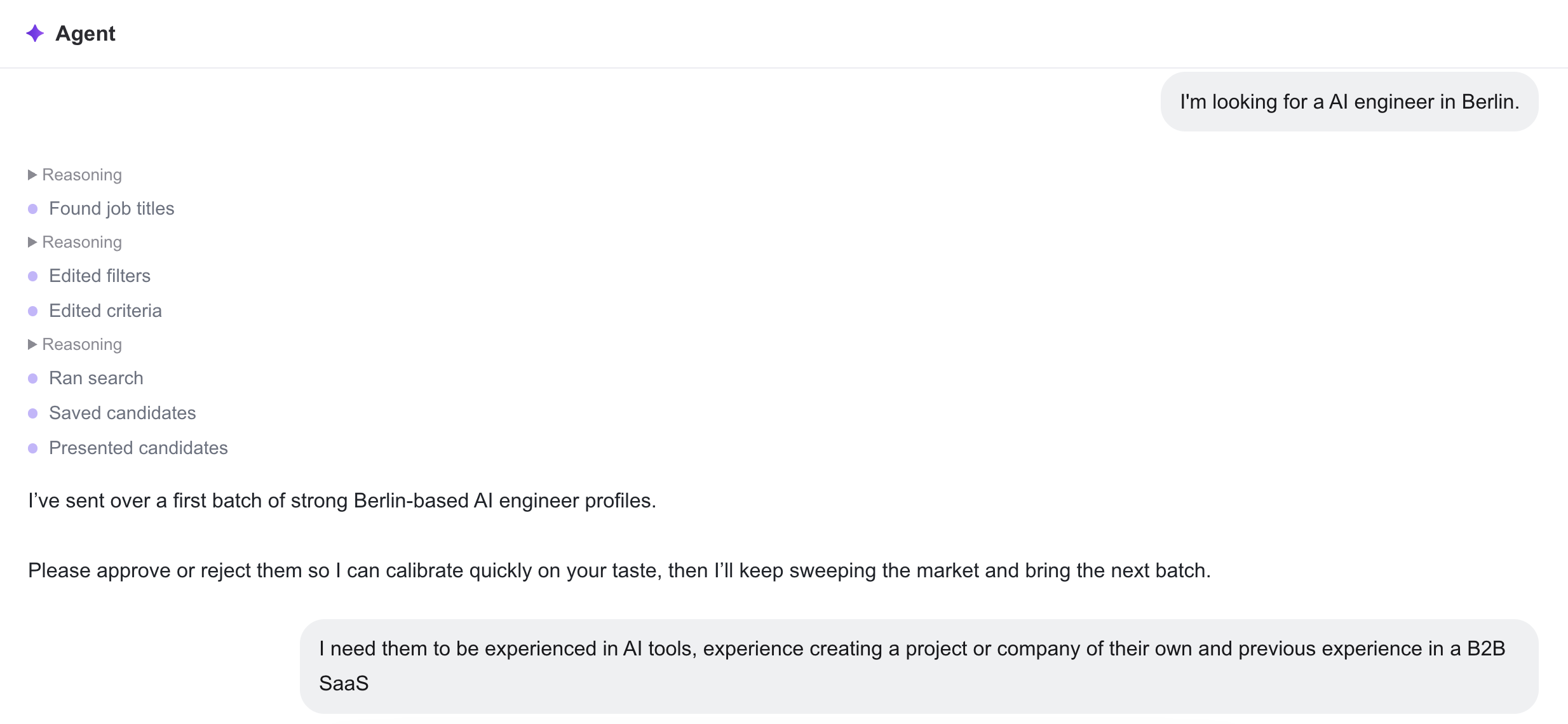
Agent Mode isn't a one-shot search. It works in batches and gets smarter with every round of feedback. After sending an initial set of candidates, the agent uses your approvals and rejections to calibrate, then continues sweeping the market and delivering refined results. You interact with it conversationally, much like you would with any AI assistant such as Claude or ChatGPT.
- Batch Delivery: The agent sources candidates in batches (for example, a first set of strong Munich-based AI engineers), presenting them for your review and asking you to approve or reject so it can calibrate on your taste.
- Continuous Calibration: As you approve and reject, the agent leans into the profiles closest to your approvals and tightens its pattern with each round, sending the next batch from its reserve and progressively sharpening its accuracy.
- Conversational Iteration: You can chat with the agent to guide its search, just as you would with any AI assistant. This back-and-forth lets you steer sourcing in real time until the results match exactly what you're after.
How the Agent Uses Credits
Agent Mode draws from the same shared pool of Profile Credits as the rest of Taleva, but with its own pricing: instead of paying per search, you pay per candidate the agent presents. The agent usually presents five candidates per batch, and each presented candidate costs 20 credits.
Credits are charged when a batch is presented, regardless of whether you approve or reject the candidates. Rejections are not wasted: they calibrate the agent, so the next batches fit your role better.
Note
Only presented candidates cost credits. Chatting with the agent, giving feedback on your decisions, and reviewing profiles in Revision Mode are free.
From Agent to Action
Once the agent has finished iterating and you've approved and shortlisted the candidates you want, the workflow comes full circle. The people you've selected move into your Shortlist, where you can take whatever next step your process requires, turning AI-sourced prospects into real, actionable candidates.
- Move to the Shortlist: All approved and shortlisted candidates land in your Shortlist, ready to be worked. This is where sourcing hands off to active recruitment.
- Contact & Sequence: From the Shortlist you can reach out to candidates directly or Add to Sequence, dropping them straight into an automated outreach flow.
- Export: Export your candidates at any time, as a Spreadsheet, PDF, or into your ATS, to share, analyze, or sync them with your other systems.
- Track Progress: Use the customizable status pipeline (Table or Kanban) to manage each candidate through your hiring stages, from first contact all the way to Hired.